Products
OneLink Panel OneLink RADIUS Features Hosting models Pricing Book a demo How OneLink Panel works
Theme
Login
Panel login RADIUS login Start free
ISP Billing · RADIUS · Network Management

Run your whole ISP from one place — billing, RADIUS and recovery on autopilot.

Already on Zalpro, ELB or another billing panel? OneLink Panel automates it. Want your own system? OneLink RADIUS gives you FreeRADIUS, Mikrotik control, resellers, OLT, staff and a branded client app — hosted the way you choose.

Pay only for active users FreeRADIUS + Mikrotik User, Staff & Dealer apps
radius.onelink.pk/dealer
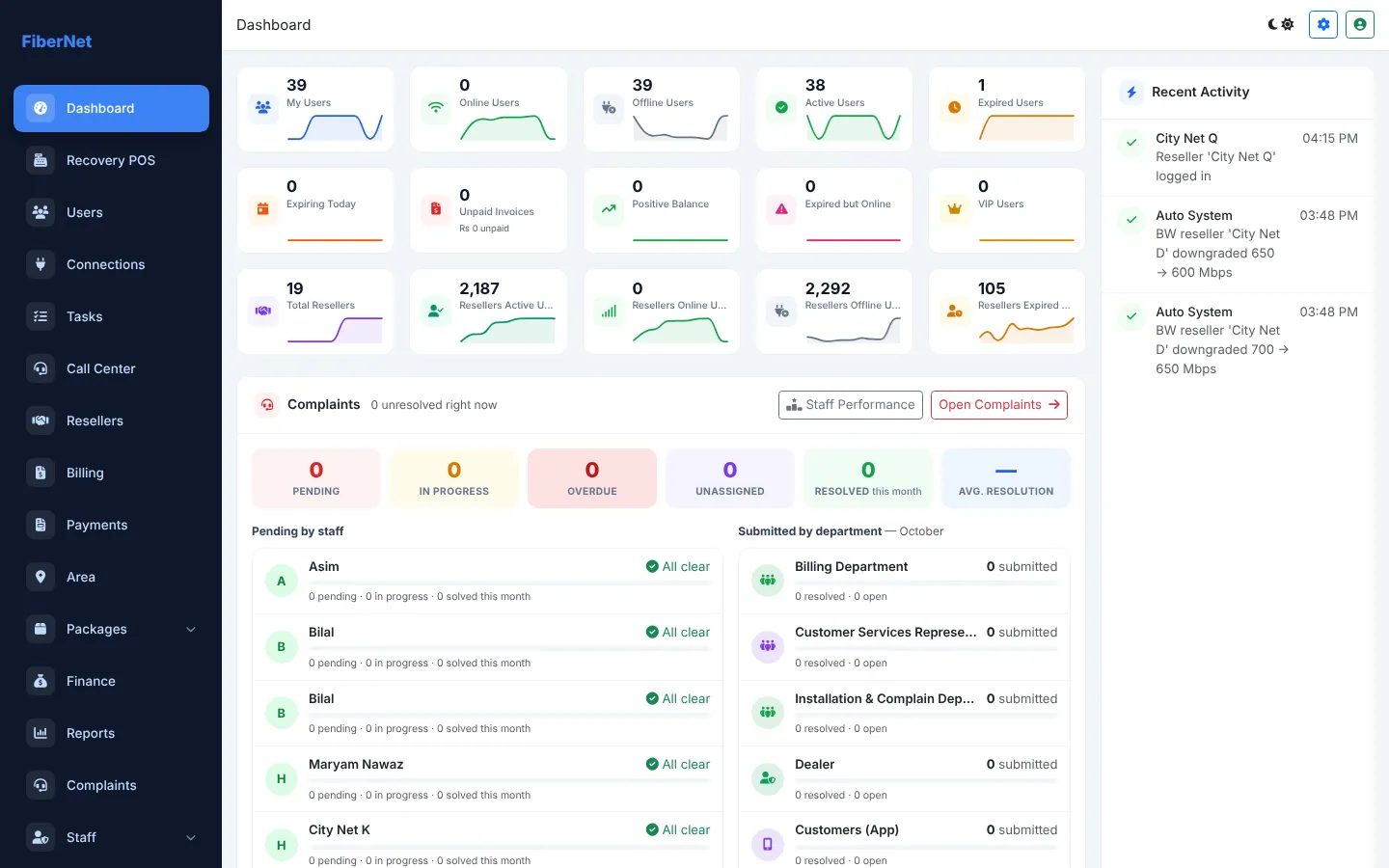
OneLink RADIUS dashboard — users, online, expiring, resellers and complaints
Renewed automaticallywallet → package, no call needed
Active users onlyExpired & disabled users are never billed
Live in minutesSign up free — no card, no setup fee
3 hosting modelsShared Cloud, Separate Cloud or On-Premise
Built in PakistanJazzCash, Easypaisa, WhatsApp & Urdu support
Product tour · real screens

See exactly what you get — before you sign up.

These are the actual OneLink RADIUS screens your office team works on every day (with demo customer names).

Dashboard

Your whole ISP on one screen

Online and offline users, expiring today, unpaid invoices, resellers and complaints by staff — the moment you log in.

  • Live counters with 7-day trends
  • Recent activity of your team and resellers
  • Complaints pending per staff member
radius.onelink.pk/dealer
OneLink RADIUS — Dashboard screen
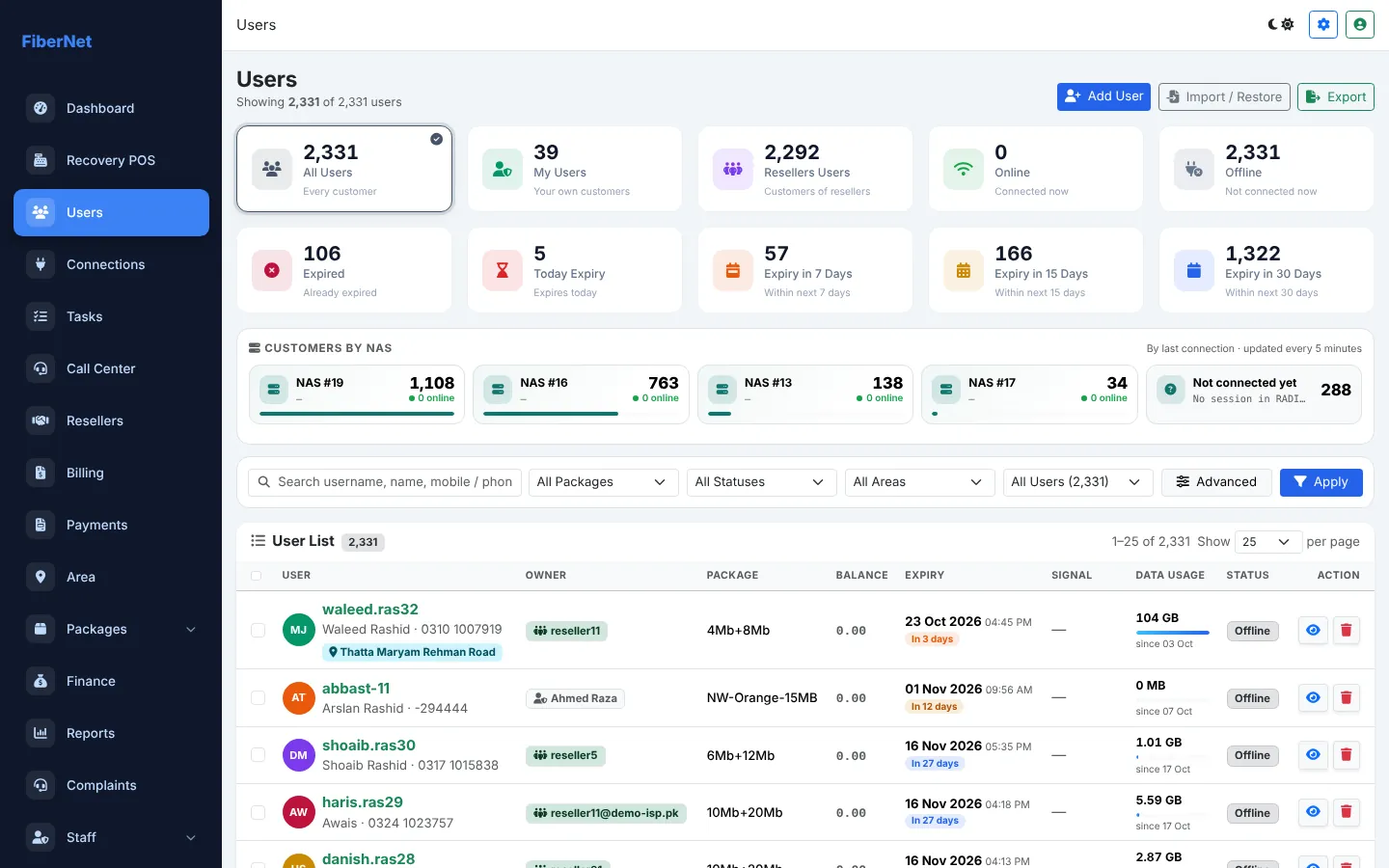
Users

Every PPPoE user, properly organised

Package, expiry, balance, data usage, owner and live status for thousands of users — filter by NAS, area, package or reseller.

  • Expiring today / 7 / 15 / 30 days at a glance
  • Customers by NAS with online counts
  • Bulk actions, import & export
radius.onelink.pk/dealer
OneLink RADIUS — Users screen
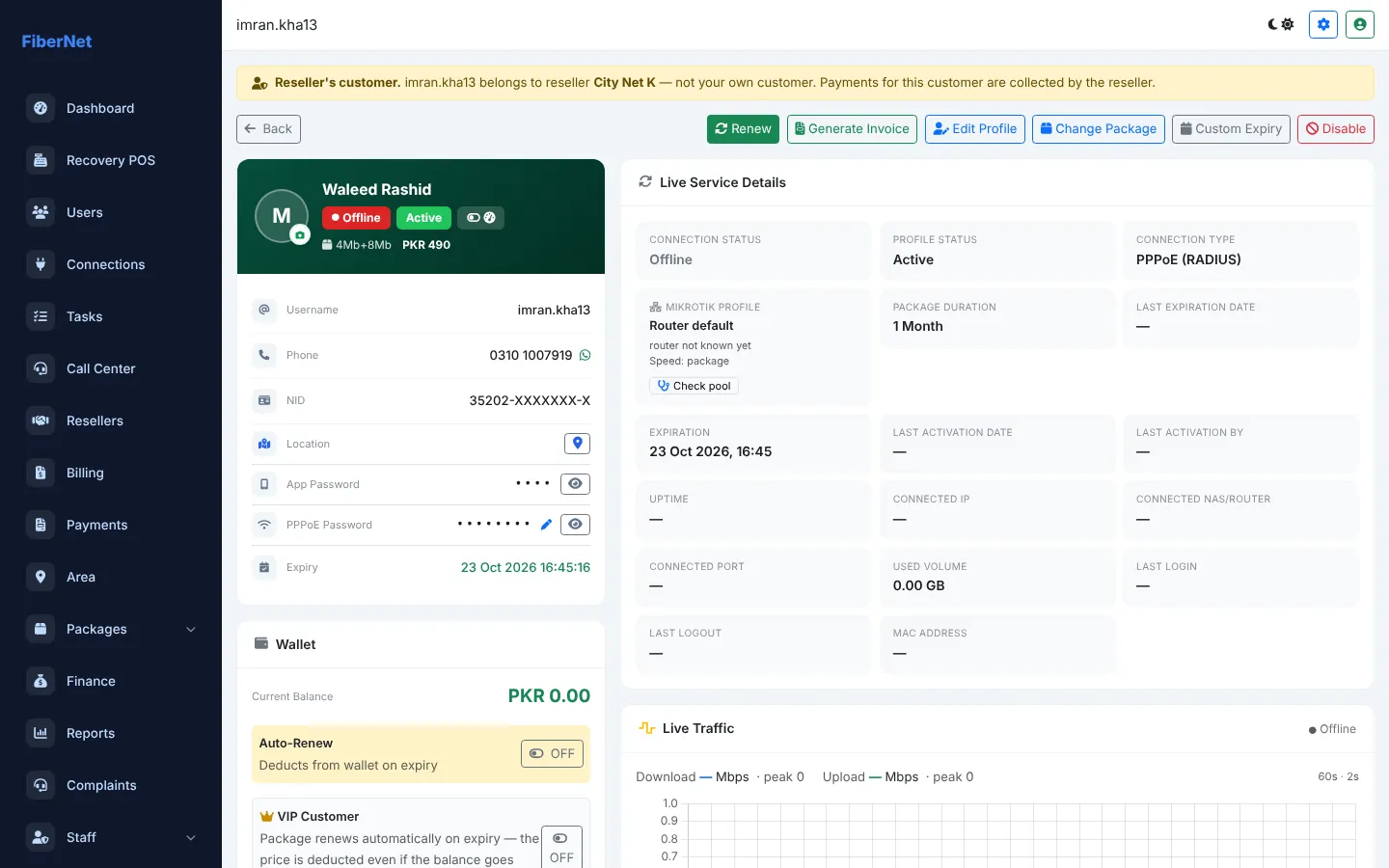
Customer profile

One page for everything about a customer

Renew, change package, generate invoice, wallet, auto-renew, VIP, MAC lock, live traffic and connection details.

  • Live service details from RADIUS & Mikrotik
  • Wallet, invoices and payment history
  • ONU signal & Wi-Fi from the OLT / ACS
radius.onelink.pk/dealer
OneLink RADIUS — Customer profile screen
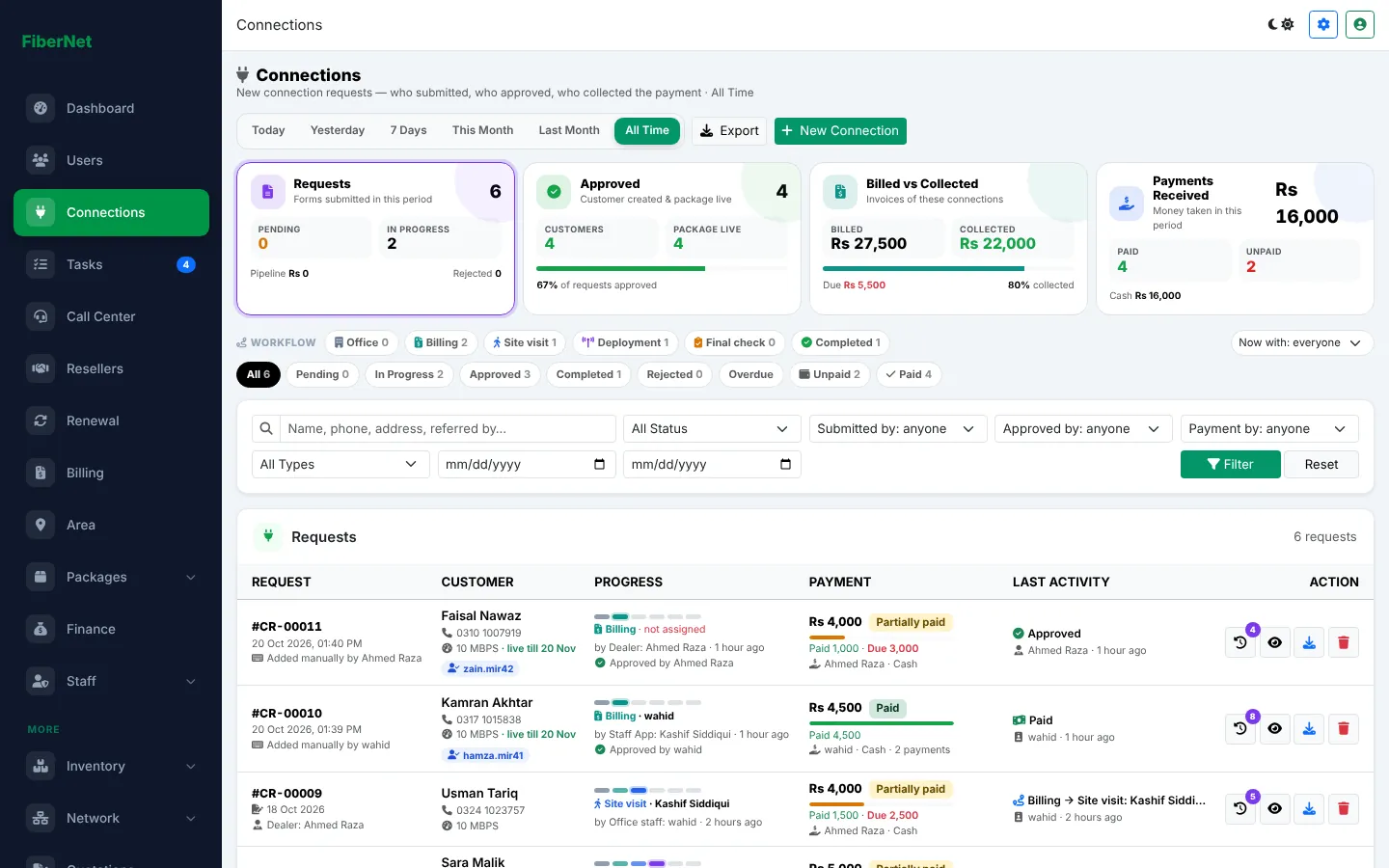
New connections

From form to installation — every step tracked

Office → Billing → Site visit → Deployment → Final check. See who has each request, what was paid and what is still due.

  • Paper form date, payment taken on the spot
  • Extra fiber added to the same invoice
  • Customer tracking link on WhatsApp
radius.onelink.pk/dealer
OneLink RADIUS — New connections screen
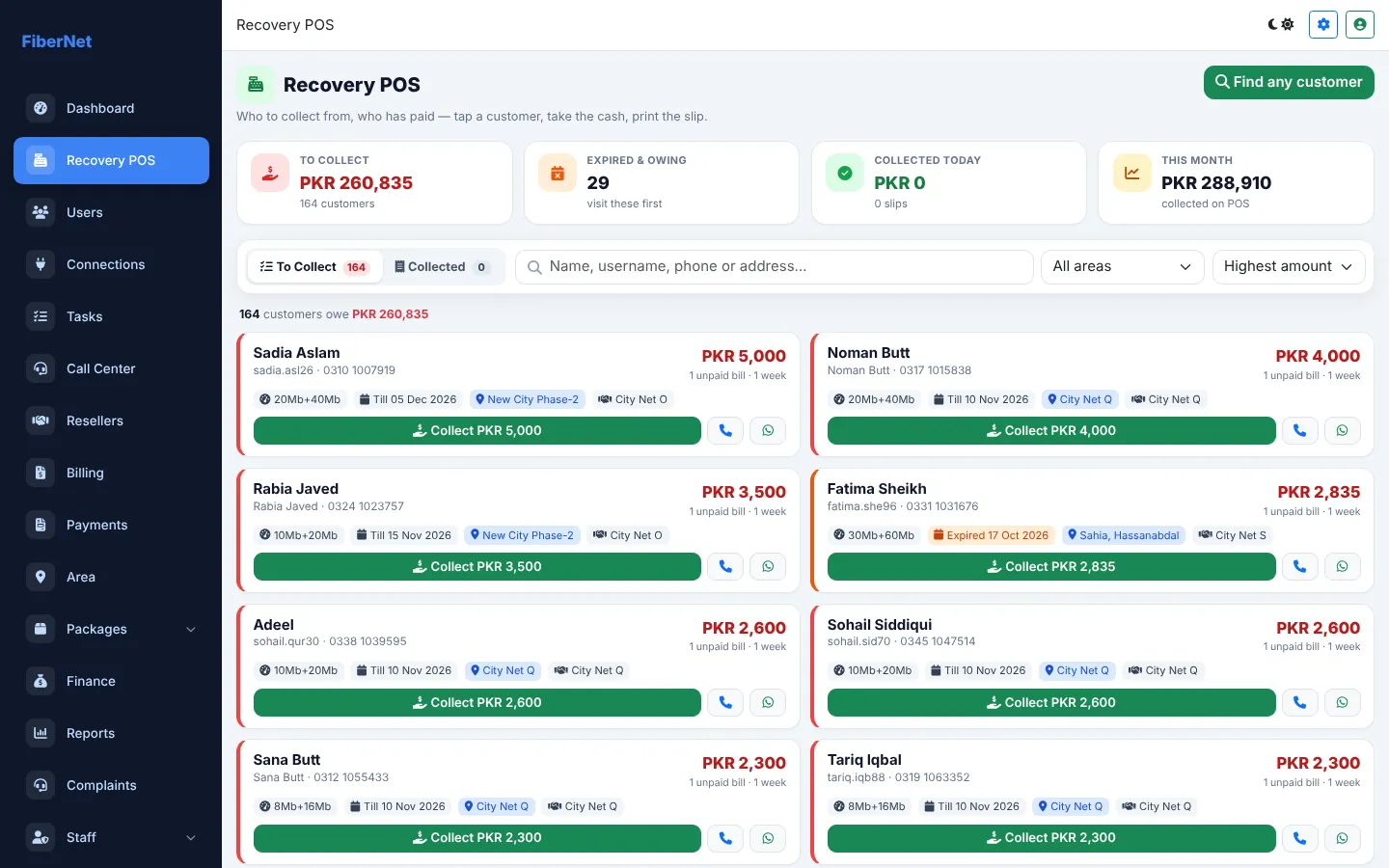
Recovery POS

Collect faster with Recovery POS

Who owes how much, sorted by amount — tap a customer, take the cash and print the slip. The cash lands in that collector's cash in hand.

  • To collect / expired & owing / collected today
  • Call & WhatsApp from the card
  • Printed slips and cash-in-hand per staff
radius.onelink.pk/dealer
OneLink RADIUS — Recovery POS screen
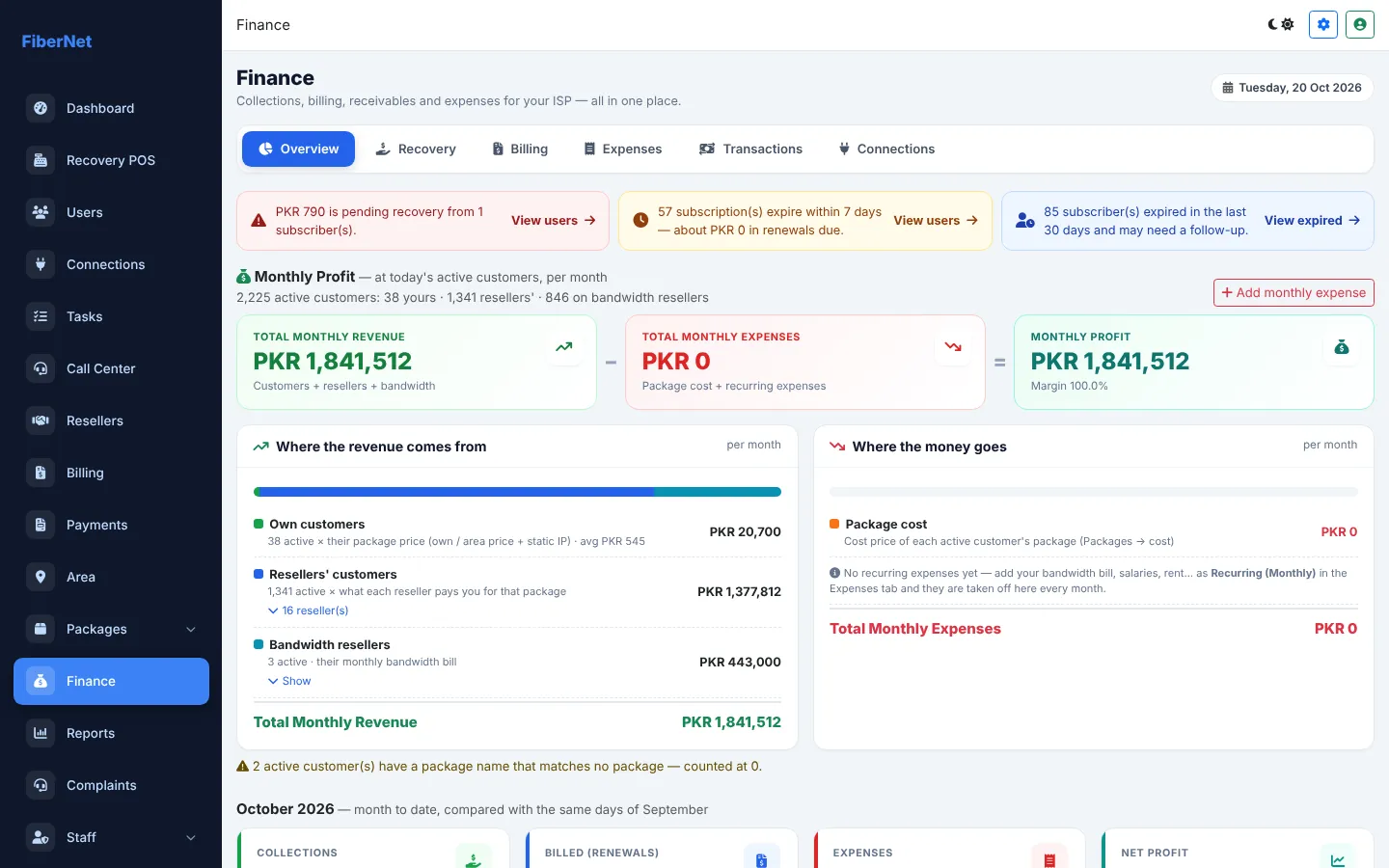
Finance

Know your real monthly profit

Revenue from your own customers, resellers and bandwidth resellers against package costs and expenses.

  • Monthly revenue, expenses and margin
  • Recovery, billing and transactions tabs
  • Alerts for pending recovery and expiries
radius.onelink.pk/dealer
OneLink RADIUS — Finance screen
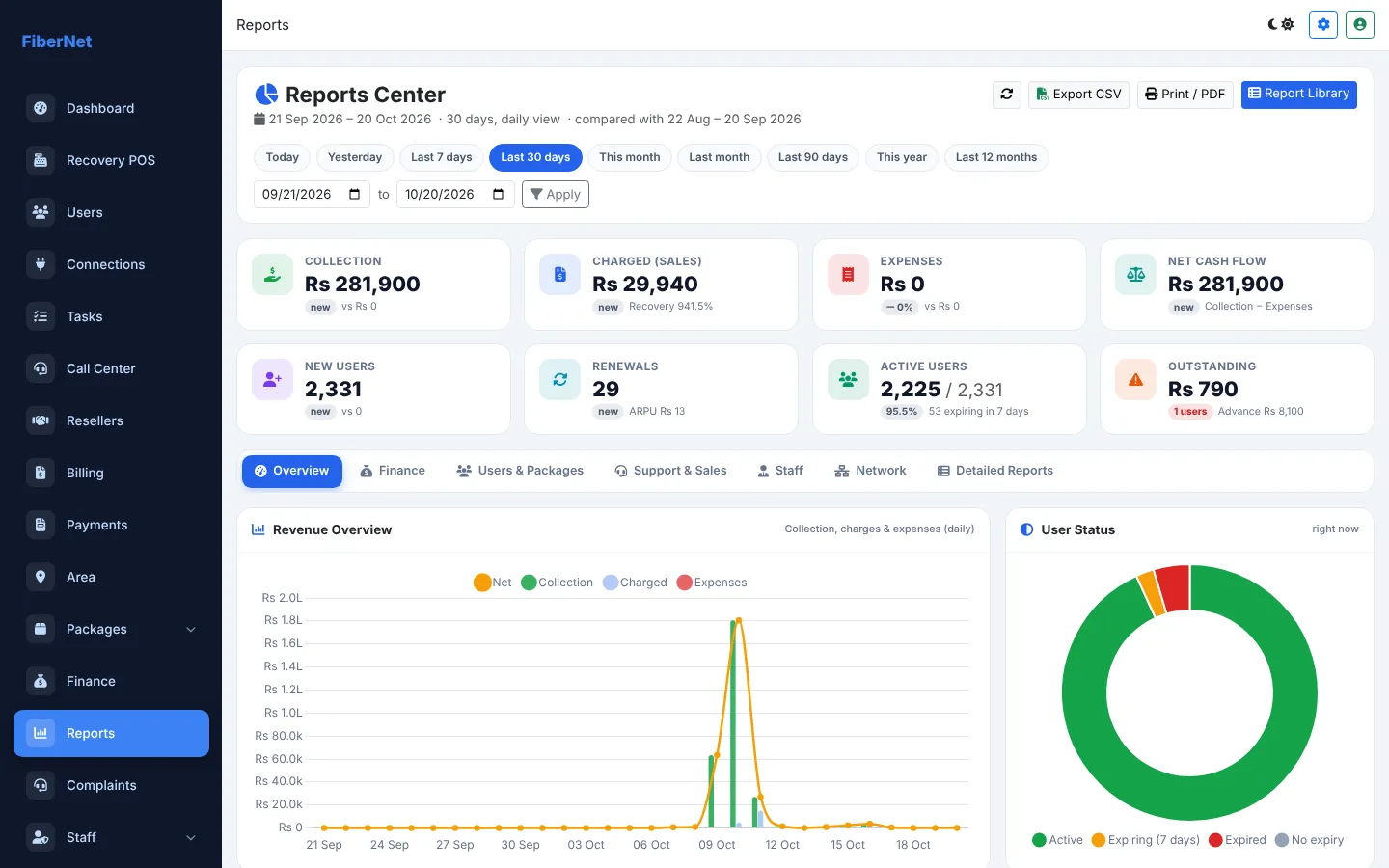
Reports

Reports you can actually use

Collection, sales, renewals, new and active users — any period, compared with the period before, with CSV and print.

  • Revenue overview chart
  • User status breakdown
  • Finance, staff, network & detailed reports
radius.onelink.pk/dealer
OneLink RADIUS — Reports screen
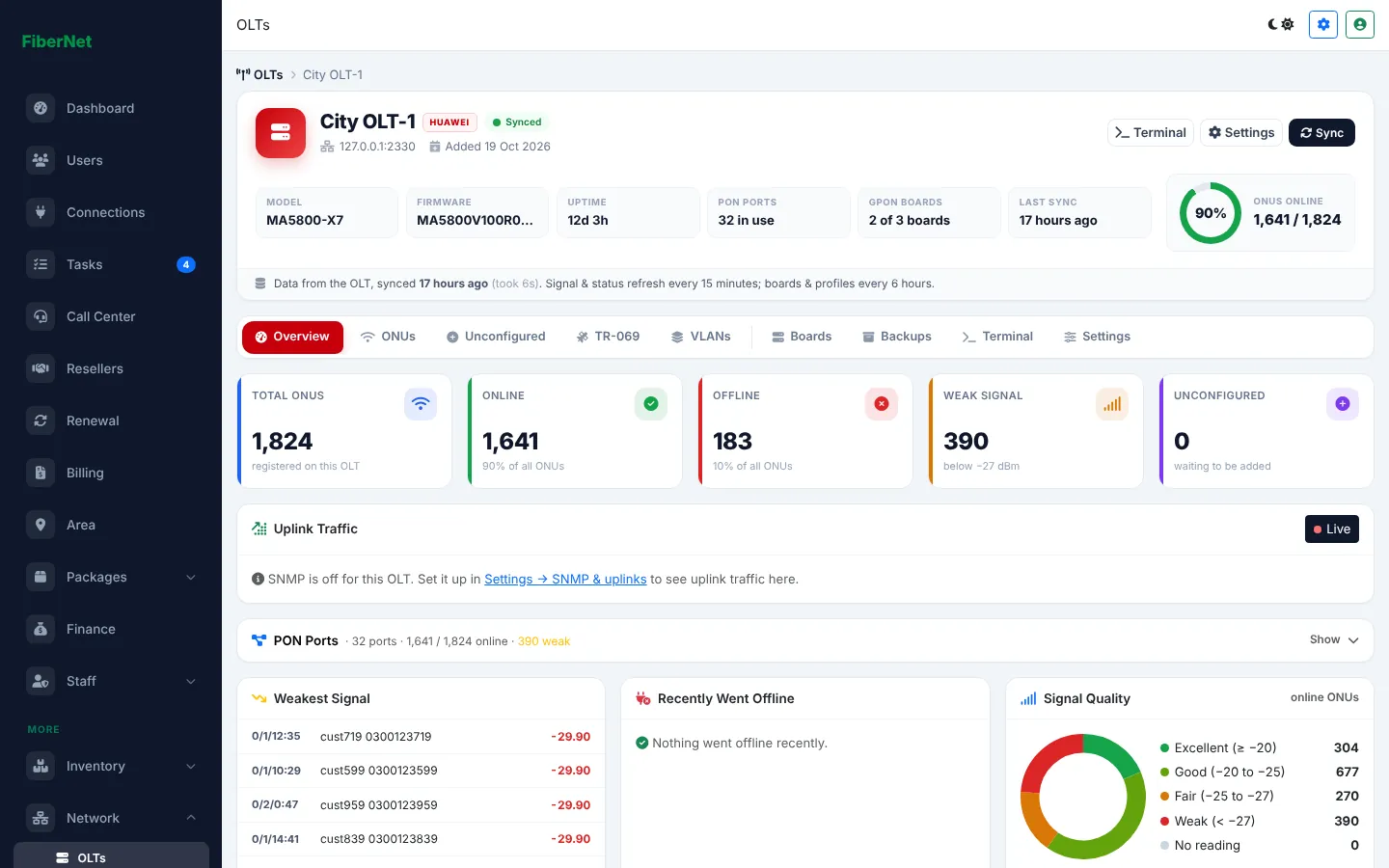
OLT & ONU

Your fiber network, live

Huawei OLT with every ONU — online / offline, weak signal, PON ports and the weakest customers — synced on its own.

  • Signal quality chart & weakest ONUs
  • Unconfigured ONUs, VLANs, boards & backups
  • TR-069 / GenieACS for Wi-Fi changes
radius.onelink.pk/dealer
OneLink RADIUS — OLT & ONU screen
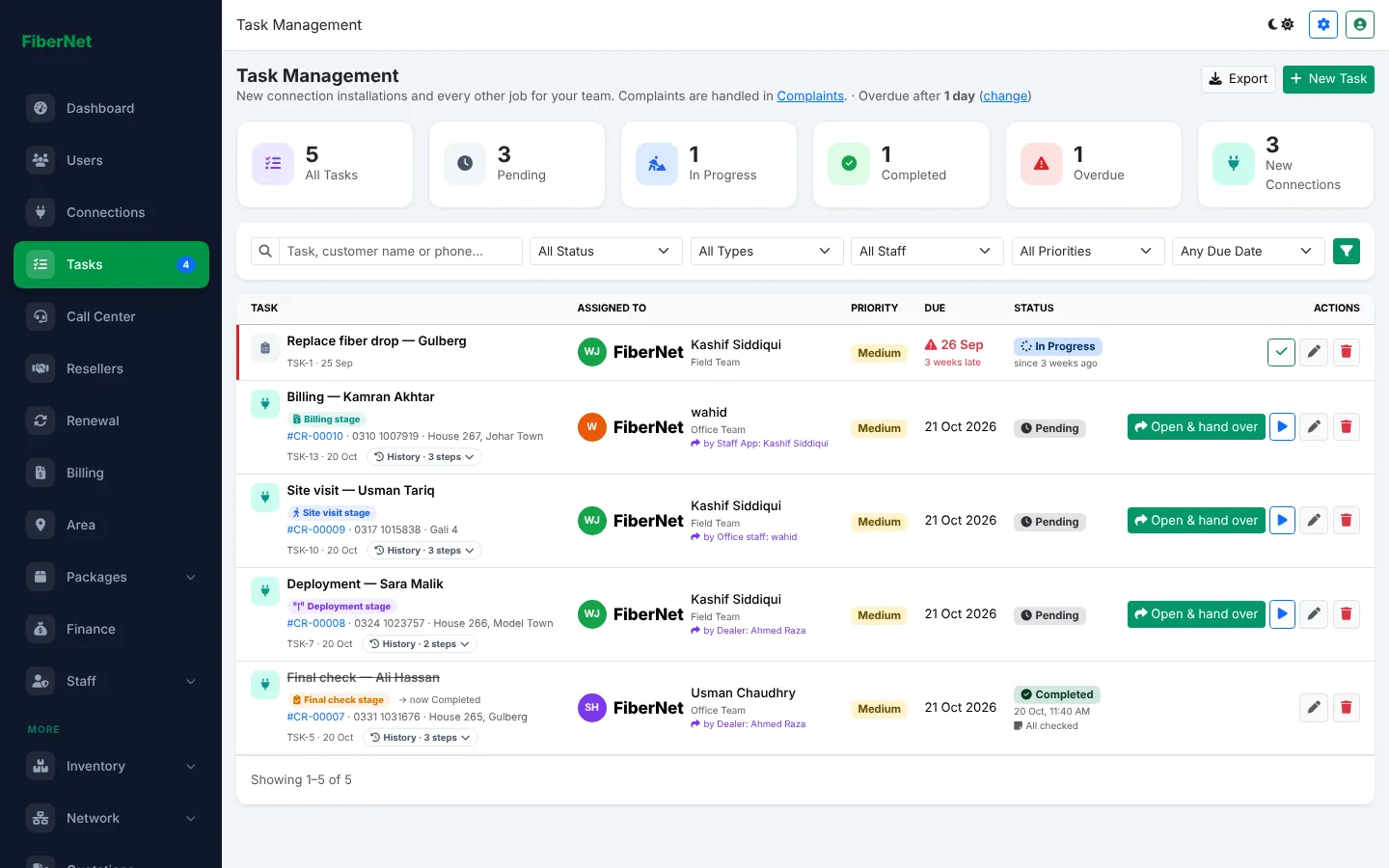
Tasks

Every job with its owner and history

One row per connection or job: who has it now, who assigned it, and the full stage history on click.

  • Staff see only their own tasks
  • "Open & hand over" to the next stage
  • Overdue jobs highlighted
radius.onelink.pk/dealer
OneLink RADIUS — Tasks screen
Two products · one team

Pick the OneLink that fits how your ISP runs today.

Keep your current billing panel and automate it — or move to your own complete RADIUS system. Both come with WhatsApp alerts, online payments and the branded client app.

OneLink Panel

panel.onelink.pk · for ISPs on Zalpro, ELB & similar panels

Sits on top of the billing panel you already use. Your users import automatically and OneLink takes over renewals, recovery and customer communication.

  • Connect Zalpro, ELB or another supported panel in minutes
  • Auto activation & renewal when the wallet has balance
  • Recovery reminders and daily reports on WhatsApp
  • Custom per-client pricing and monthly profit
  • Branded client app, Dealer App & OneLink Forwarder

OneLink RADIUS

radius.onelink.pk · a complete ISP system with its own RADIUS

Your own FreeRADIUS-based billing and network platform: PPPoE users, Mikrotik NAS, resellers, OLT, fiber, staff and finance in one place — on Shared Cloud, Separate Cloud or your own server.

  • FreeRADIUS PPPoE auth with live sessions & Mikrotik control
  • Resellers, sub-dealers and bandwidth resellers
  • Huawei OLT/ONU, GenieACS Wi-Fi change, fiber map
  • Office & field staff with apps, tasks and complaints
  • Three hosting models — Separate Cloud recommended
OneLink Panel · How it works

Three steps between you and a fully automated billing cycle.

No migration headaches — OneLink Panel sits on top of the panel you already use. See the full walkthrough →

01 / CONNECT

Connect your panel

Link your existing Zalpro, ELB or other supported billing panel — your users import automatically, nothing to re-enter.

02 / CONFIGURE

Set your prices & payments

Set custom pricing per client, add your payment methods, and choose exactly which WhatsApp updates go out and when.

03 / LAUNCH

Give clients the app

Share the OneLink Client App — customers recharge, renew and track usage themselves, day or night.

Built for both sides of the connection

One platform, two people who benefit every day.

No more manual activation

Renewals and package activation happen automatically the moment a client's wallet has enough balance.

Proper reporting

Daily users, recovery and expense reports land in your WhatsApp — at the exact time you choose.

Recovery, on time

Automated reminders and post-expiry follow-ups mean payments arrive without you following up by hand.

Custom client pricing

Set a different renewal price per client, independent of your standard package rates.

Your own package pricing

Price every package exactly how you want — OneLink never dictates your margins.

Monthly profit, visible

Track recovery against expenses and see real monthly profit without a separate spreadsheet.

Self-service packages

Clients activate, upgrade or downgrade their own package — no call to the ISP required.

Live usage graph

Real-time bandwidth and data usage, visible right inside the app.

Expiry, always visible

No surprises — every client can see exactly when their package expires.

Real WhatsApp updates

Recharge confirmations, expiry warnings and renewal receipts, sent where clients already look.

Submit a complaint

Raise and track a complaint directly from the app — with photo and location if needed.

Recharge in seconds

Top up the wallet and renew — the whole cycle takes under a minute.

OneLink RADIUS

Your own RADIUS. Your Mikrotiks. Every user, reseller and rupee in one dashboard.

OneLink RADIUS replaces the patchwork of panels, spreadsheets and WhatsApp groups with one system built for Pakistani ISPs — from the PPPoE login on your Mikrotik to the payment slip in your customer's hand.

  • FreeRADIUS + Mikrotik — PPPoE auth, live sessions, queues, static IPs and live traffic graphs.
  • Resellers & bandwidth resellers — wallets, packages, invoices, trust score and their own panel.
  • Payments that verify themselves — OCR TID reading, duplicate detection and auto-matching via OneLink Forwarder.
  • Fiber & field — Huawei OLT/ONU, fiber map, staff app with live tracking, complaints and tasks.
radius.onelink.pk/dealer/connections
New connection workflow — progress, payment and history of every request
OneLink RADIUS · Hosting models

Run it on our cloud, on a server just for you, or on your own server.

Same OneLink RADIUS, three ways to host it. Start on any of them — you can move up later without re-entering a single user.

Shared Cloud

Start in minutes · nothing to install

Everything runs on the OneLink cloud. Your Mikrotiks connect to it over a secure WireGuard tunnel.

Best for new and small ISPs who want to go live today.
  • Instant account — no server, no setup
  • All RADIUS features included
  • Updates and backups handled by OneLink
  • Upgrade to Separate Cloud any time
Sign up — Shared Cloud
Sign up and start straight away — billing starts only when you have active users.

On-Premise

Your own server in your office

Install on your own hardware with one command and an activation key. RADIUS authenticates locally — it keeps working even if the internet goes down.

Best for ISPs that want RADIUS on a server inside their own office, with their own IT team.

Runs on your server — if your server, power or internet is down, the panel, apps and recovery are down too.

  • One-command install + activation key
  • PPPoE logins answered locally
  • LAN-speed authentication
  • Software updates delivered automatically
Sign up — On-Premise
Sign up and get your install command and activation key.

What's included in each model

OneLink Client App

The app your clients will actually want to open.

Every OneLink account — Panel or RADIUS — comes with a client app in your brand: recharge, renew, upgrade, live usage, complaints and Wi-Fi password change, all in your customers' pockets. Fewer calls to your office, faster payments to you.

Fair pricing

You pay only for the users who are actually active.

Sign up free. Active users are counted from the 25th and one simple bill is made on the 1st — expired, disabled and dead users never appear on it. No setup fee, no card at sign-up.

FAQ

Questions ISPs ask us first.

What is the difference between OneLink Panel and OneLink RADIUS?

OneLink Panel works on top of a billing panel you already use (such as Zalpro or ELB) and automates renewals, recovery and customer communication. OneLink RADIUS is a complete ISP system with its own FreeRADIUS server, Mikrotik NAS management, resellers, OLT, staff and finance — no other panel needed.

Which hosting model should I choose for OneLink RADIUS?

We recommend Separate Cloud for most ISPs: you get a dedicated server only for your ISP, with your own RADIUS and database, while OneLink handles the setup, monitoring and updates. It is the fastest model — fully optimized and CDN-based — and your panel, apps and recovery keep working even when your office internet or power is down. Shared Cloud is the quickest way to start, and On-Premise suits ISPs that want RADIUS on their own server and have their own IT team.

Can I move from Shared Cloud to Separate Cloud or On-Premise later?

Yes. OneLink includes a migration tool that moves your users, packages, resellers and history to your new server — your subscribers stay online and nothing is re-entered by hand.

Does OneLink work with Mikrotik?

Yes. OneLink RADIUS authenticates PPPoE users on your Mikrotik routers through FreeRADIUS and connects to them over the API for live sessions, queues, static IPs and live traffic graphs. Routers connect securely over a WireGuard tunnel.

How do customers pay?

Customers pay through JazzCash, Easypaisa, bank transfer or your online gateway from the branded client app. Screenshots are read automatically (TID and amount), duplicates are flagged, and the OneLink Forwarder app can match bank and wallet SMS to payments automatically.

How much does OneLink cost?

You are billed only on your active users — expired, disabled and dead users are never counted. Sign up is free with no card; users are counted from the 25th and your bill is made on the 1st. Fill the form on the Pricing page or book a demo and we will share your exact quote.

Ready when you are

Automate your ISP this week.

Free to get started. Bring your existing panel — or start fresh on your own RADIUS.